
Overview
The questionnaire tab will display any questionnaires that have been configured to appear in your proposal. These questionnaires contain can contain a number of questions that may have branching logic where certain responses may require additional questions to be answered. The questionnaires allow institutions to gather internal information and data required for form population in S2S Grants.gov submissions. If more than one questionnaire is valid for your proposal, you will see multiple named tabs in the screen.
Questionnaires can be maintained to
- Always appear in every proposal
- Conditionally appear in a proposal (e.g. elements in your proposal trigger the questionnaire’s appearance – such as a particular s2s form)
- Rule invoked: The questions presented in the questionnaire can vary based on specific S2S forms in your proposal
- Be Mandatory – must be completely answered to submit the proposal to workflow
- Be Optional – not required to be answered to submit the proposal
Questionnaire
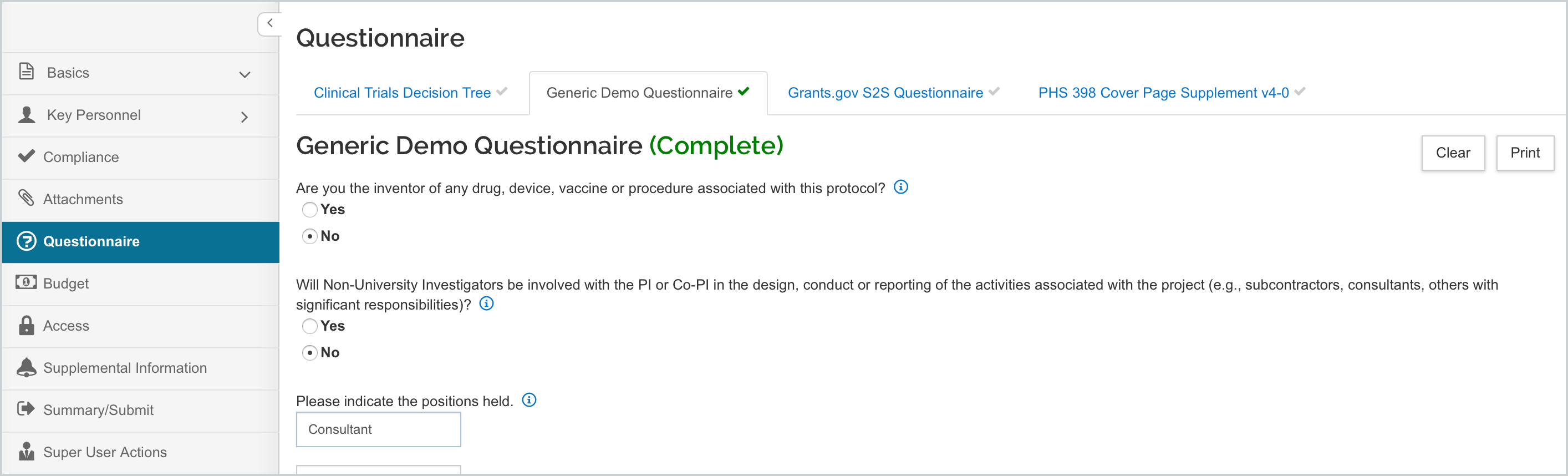
Multiple questionnaires can exist and are accessible by clicking on the tab navigation along the top. Each questionnaire tab will also have the Incomplete or Complete status indicator; when all the questions are answered and saved the status shows as complete.
Each questionnaire will also have a Clear and Print button. The Clear button will delete all answers and clear the questionnaire. The Print button will generate a PDF of the questionnaire with answers to be printed if desired.
The types of question answers that may be present in a questionnaire:
- Yes/No radio button: click a button to select that answer
- Yes/No/NA radio button: click a button to select that answer
- Date: Click on the calendar tool and use the arrows to select Month and Year, and click on the number for the Day; or manually type in the date in MM/DD/YYYY format.
- Selection List: click in the field to see the available options, scroll the item you wish to select to highlight it.
- Lookup: use a lookup to return an appropriate value.
- Text Entry: manually enter text in the field - could be restricted to numbers only or length/character count could also be limited.
Grants.gov S2S Questionnaire
KRMS rules at the question level in the questionnaire will trigger which questions/questionnaires appear in the Questionnaire tab of the proposal. When a s2s opportunity that is linked to a questionnaire is attached to the proposal the KRMS rules will be evaluated and the questions with qualifying rules will appear on the Grants.gov S2S Questionnaire in the proposal.
There are other s2s form-related questionnaires that will present in a separate tab than the Grants.gov S2S Questionnaire, based on the selected s2s opportunity. If the form that requires a questionnaire is marked for inclusion in the Forms panel it will make trigger the required form questionnaire. Form specific instructions for the S2S can be found in the System-2-System (S2S) knowledge base section.
Configuring Questionnaires
More information on creating and managing questionnaires can be found in the Maintenance - Create a Questionnaire article.
Comments
0 comments
Article is closed for comments.