
Overview
The Periods & Totals tab pre-populates with a row for each 12 month budget period which defaults from the Start Date and End Date in the proposal details. Initially it allows users to manually enter values in the Direct and Indirect (F&A) but as soon as any line items are added in the Personnel or Non-Personnel tab it will automatically populate the budget period and totals and become read only.
This screen supports a variety of budget functions and gives users the option to edit the periods or specify different periods that fall within the start/end date of the proposal. Below outlines the functionality available in the Periods & Totals tab of the budget.
Periods & Totals
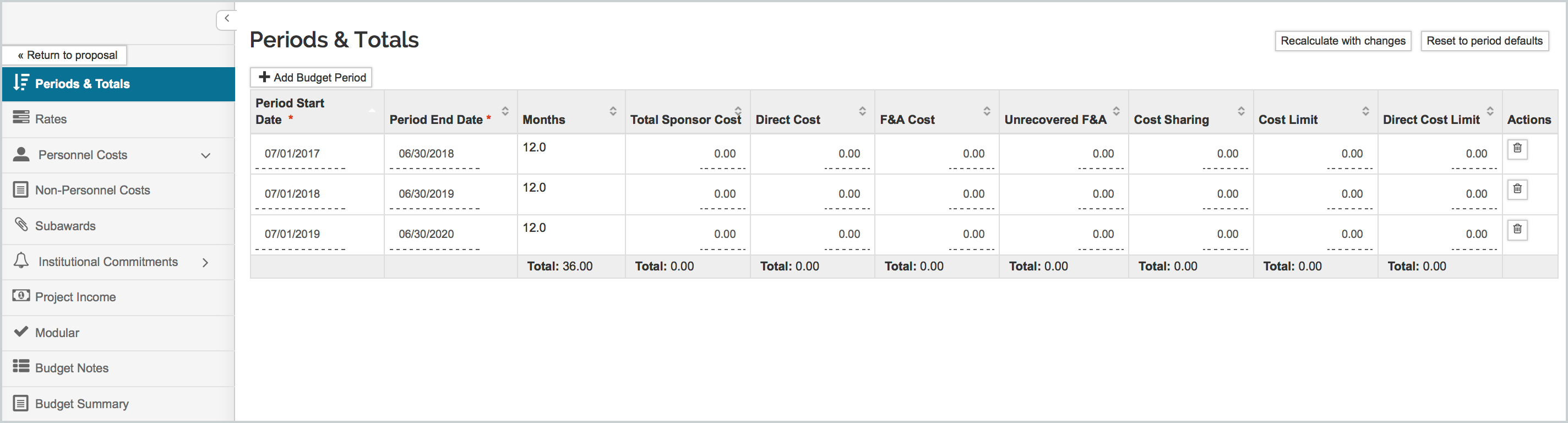
Add Budget Period: The system default creates 12-month budget periods based on the proposal start and end date. Use Add Budget Period to create budget periods to suit your proposal submission. Depending on the changes, you may want to delete the existing periods, because the added periods must remain within the pre-defined proposal start and end dates. Or you may wish to start by editing the existing periods start/end dates. Be aware that the start date of period one cannot be set at an earlier date than the Project Start Date, nor can the end date of the final period exceed the Project End Date.
Also, there may be situations where a detailed budget is not required but Direct, Indirect (F&A), and Total budget costs must be available for sponsor forms or institutional submissions. The Kuali Research Periods & Totals screen allows the user to manually enter values in the Direct and Indirect fields. These values will be mapped to the S2S cover page form (SF 424 series), and populate the Institutional Proposal. Once you start adding detailed line items to either the Personnel or Non-Personnel tab it will automatically populate the budget period and totals for the given period and become read only.
Recalculate with changes: calculates all budget periods with any updates or new additions.
Reset to period defaults: This button restores the table to use 12 month project periods (starting at the proposal start date) and providing as many 12-month periods as possible, with any number of months less than 12 in the final period.
Cost Limits: The Cost Limit (total) and Direct Cost Limit fields for each Budget Period are initially set to zero. You can enter a value into on or the other of these fields to apply to your detailed budget. In addition to alerts to exceeding the value, a ‘sync to total cost limit’ and ‘sync to period cost limit’ buttons in the non-personnel line items help to refine your budget by reducing or increasing the selected amount to reach the limit.
Comments
0 comments
Article is closed for comments.