
Overview
Within Kuali Research COI you can configure project functionality that will automatically push projects created or updated in the Sponsored Projects modules (Proposals, Institutional Proposals and/or Awards). You can also utilize manual projects where end users can manually enter a project that's not fed from the Sponsored Projects side. Below outlines how to configure for projects and how to utilize the project specific gadgets in the disclosure template to take advantage of this functionality. Information on other non-project gadgets can be found in the Compliance - Form Gadgets article.
Configuration for Projects
To set up projects for COI disclosures it takes some configuration prior to incorporating the Project gadgets in your template. You can start with the project specific configuration related to projects pushed from the Sponsored Projects system or Custom Projects in the Project Requirements of Configuration; more info on this can be found in the COI - Configuration - Project Requirements article. The COI General Configuration and the Linked_Project_Push_Enabled parameter also controls how certain functionality works in association with the Project Gadgets in the template.
Specifically, if you want to utilize the Disclose once at PD/IP stage and have the disclosure carry over to award in General Configuration. If checked, allows you to carry forward disclosure information on a Proposal Development and Institutional Proposal to an Award so not all stages have to be disclosed upon separately. Be aware, this is only related to projects being pushed from the Kuali Research Sponsored Projects system (if implemented). This also requires additional configuration on the Sponsored Projects side via the Linked_Project_Push_Enabled parameter and you can more fully utilize the functionality using the 'Project - Linked Projects' form designer gadget; more information on this gadget is below. Please be aware - when this is enabled it will automatically carry forward disclosure information from Proposal to IP to Award and only the highest project type will display in a user's disclosure.
Lastly, information on how templates work in general can be found in the COI - Templates article. Once you've set up the desired configuration you can then create your template using the Project gadgets explained above.
Using Project Gadgets
Project gadgets give the options to integrate your disclosure with project information from the Sponsored Projects module of Kuali Research so you can automatically push to require disclosure on projects (Proposals, Institutional Proposals, and/or Awards). You can also add questionnaires for projects to gather additional information as desired. Below outlines what each Project gadget does and how to utilize it within the template.
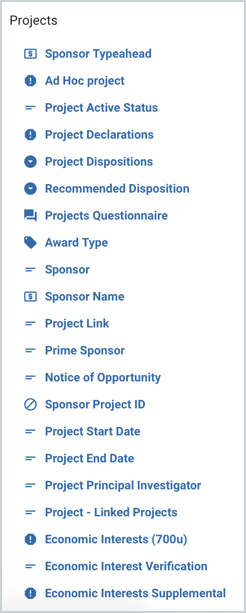
- Sponsor Typeahead - Allows you to link directly to the Sponsor maintenance table so you can have a refined list to search from when looking up sponsors related to Financial Entities. If you want to use this function and the Kuali out of the box reporting make sure the Field Key is sponsorEntityName.
- Ad Hoc project - This is the gadget used to utilize the Custom Projects created in the Project Requirements of Configuration. If included in the template it allows users to manually enter a project associated with their disclosure (either by the reporter of COI Admin; depending on how it's configured). FYI: If this gadget is added to a page with the project questionnaire or project declarations gadget then the "show parent page even if there are no projects" in the project gadget and do not require value(s) option must be selected on the projects card list.
- Project Active Status - This gadget is only used with ad-hoc projects and is recommended to be set up with progressive display with only ad-hoc projects. This will show whether the project is active; based on the active toggle available to users.
- Project Declarations - This gadget is used to utilize the Declaration options created in Project Declarations of Configuration so reporters can put a suggested declaration for their project before it's reviewed by a COI Admin. This gadget only works in the Relationships or SFI lists (available in the overall Project Declaration gadget). FYI, there are a number of static fields required for project declaration that will be added automatically when this gadget is added to the template and they cannot be deleted (Project Type, Project Number, Project Role, Sponsor Name/Code).
- Project Dispositions - This gadget is used to utilize the Disposition options created in Project Dispositions of Configuration; so COI Admins can assign a project or relationship disposition before approval. You will need to add at Project level and optionally at the Relationship level if desired. Be aware, this gadget must be assigned a projectDisposition field key that is associated. Also, the project disposition assigned to this gadget will display in the grant modules.
- Recommended Disposition - This gadget is used to utilize the Dispositions options created in Project Dispositions of Configuration; so reviewers can put a suggested disposition for the project before it's approved by a COI Admin. You can add at the Project and/or Relationship level. Be aware, this gadget must be assigned a projectRecommendedDisposition field key that is associated. Also, the project disposition assigned to this gadget will display in the grant modules.
- Projects Questionnaire - This gadget can be used to associate a specific questionnaire for a project so you can gather more information from the reporter if desired. FYI, there are a number of static fields required for project questionnaire that will be added automatically when this gadget is added to the template and they cannot be deleted (Project Type, Project Number, Project Role, Sponsor Name/Code).
- Award Type - This is a gadget that will display the Award Type information from the Project in the disclosure. You can then build progressive display with 'Award Type Is' or 'Award Type Is Not.'
- Sponsor - This is a read-only gadget that will display the Sponsor Name and Code information from the Project in the disclosure. FYI, this gadget is REQUIRED if you want to use the Projects Questionnaire or Projects Declaration gadgets.
- Sponsor Name - This is a read-only gadget that is used in conjunction with the Sponsor Typeahead gadget only. If you add it to a relationship list with the same field key that you assigned to the sponsor typeahead gadget in your financial entities list it will display the sponsor being used for each entity.
- Project Link - Allows you to include a hyperlink for the project that will take you to the record in the Sponsored Projects module. It is recommended you use progressive display so it doesn't appear for ad-hoc projects.
- Prime Sponsor - This is a read-only gadget that will display the Prime Sponsor information from the Project in the disclosure.
- Notice of Opportunity - This is a read-only gadget that will display the Notice of Opportunity information from the Project in the disclosure.
- Sponsor Project ID - This is a read-only gadget that will display the Sponsor Project ID information from the Project in the disclosure.
- Project Start Date - This is a read-only gadget that will display the Project Start Date information from the Project in the disclosure.
- Project End Date - This is a read-only gadget that will display the Project End Date information from the Project in the disclosure.
- Project Principal Investigator - This is a read-only gadget that will display the Principal Investigator information from the Project in the disclosure.
- Project - Linked Projects - Allows you to take advantage of the Disclose once at PD/IP stage in General Configuration. If checked and this gadget is used in the template, it allows you to carry forward disclosure information on a Proposal Development and Institutional Proposal to an Award so not all stages have to be disclosed upon separately. Be aware, this is only related to projects being pushed from the Kuali Research Sponsored Projects system (if implemented). This also requires additional configuration on the Sponsored Projects side via the Linked_Project_Push_Enabled parameter. This would be added to the Project Questionnaire or Project Declarations gadget.
Card List Configurations
The Project Questionnaire and Project Declarations gadgets both have a Card List embedded within them. The Economic Interests Supplemental gadget inherits the Card List functionality. The card list comes with several configurations that allow you to customize the user experience for your researchers.
- Do not require value(s): If this option is turned on then a user can submit a disclosure with no records added to this card list. This is an important configuration if you want to use Ad Hoc projects, and need to allow the projects page to display even if no projects have been pushed from grant documents.
- Default Cards to Collapsed: If this option is turned on, when a user first loads this card list all of the entries will be collapsed. For users with large project portfolios this helps eliminate white noise and lets a reporter quickly scan the card headers for the title of projects they need to take action on.
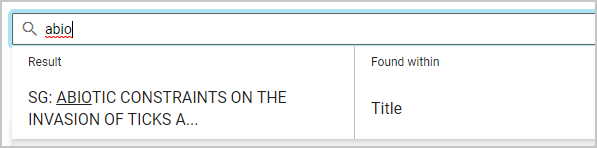
- Enable filtering: This will add a search bar above this card list. Users can search for any text based fields, including static fields in the card list entries. This allows reporters to quickly find the projects they need to take action on when the cards are collapsed. Once they begin a search they will be shown the various fields in the card lists that match their search so they can select the specific value they are looking for.
Progressive Display for Projects
With any template gadget there are options of progressive display so you can add logic to the field so they only appear when configured criteria is included. More information on progressive display on gadgets can be found in the Form Gadgets/Progressive Display article. For project gadgets there are a specific progressive display related to sponsor information that are often used for projects.
Specifically the 'Sponsor Name', 'Sponsor Typeahead', and 'Prime Sponsor' gadget options in progressive display allow you progressive display logic based on Sponsor, Sponsor Type, or within a Sponsor Hierarchy of the Sponsor on a project. The options for comparison are as follows:
- includes - if a project includes a specific sponsor (i.e. 000340, etc.).
- does not include - if a project does not include a specific sponsor (i.e. 000340, etc.).
- is sponsor type - if a project contains a sponsor with a specific sponsor type (i.e. Federal, State, etc.)
- is not sponsor type - if a project does not contain a sponsor with a specific sponsor type (i.e. Federal, State, etc.)
- has sponsor in hierarchy - if a project includes a sponsor within a specific hierarchy (i.e. COI Disclosure, NIH, etc.)
- does not have sponsor in hierarchy - if a project includes a sponsor not within a specific hierarchy (i.e. COI Disclosure, NIH, etc.)
Comments
0 comments
Article is closed for comments.