
Overview
The new NIH Validation Mapping table in the Maintenance tab works in conjunction with the NIH Validation Service and the errors/warnings that are transmitted by NIH when checking a NIH S2S proposal. This new maintenance table gives institutions the ability to customize the user received validation messages and fix-it links associated with the NIH Validation service when the Enable_NIH_Validation_Service parameter is set to Y. Bootstrap data will be available to load this table with relevant validations you may want to alter/configure that may best serve your business processes.
Using the NIH Validation Mapping table
Users that have the appropriate permissions can edit, copy, or create new in the NIH Validation Mapping maintenance table. Below is more information on the available fields in this maintenance document.
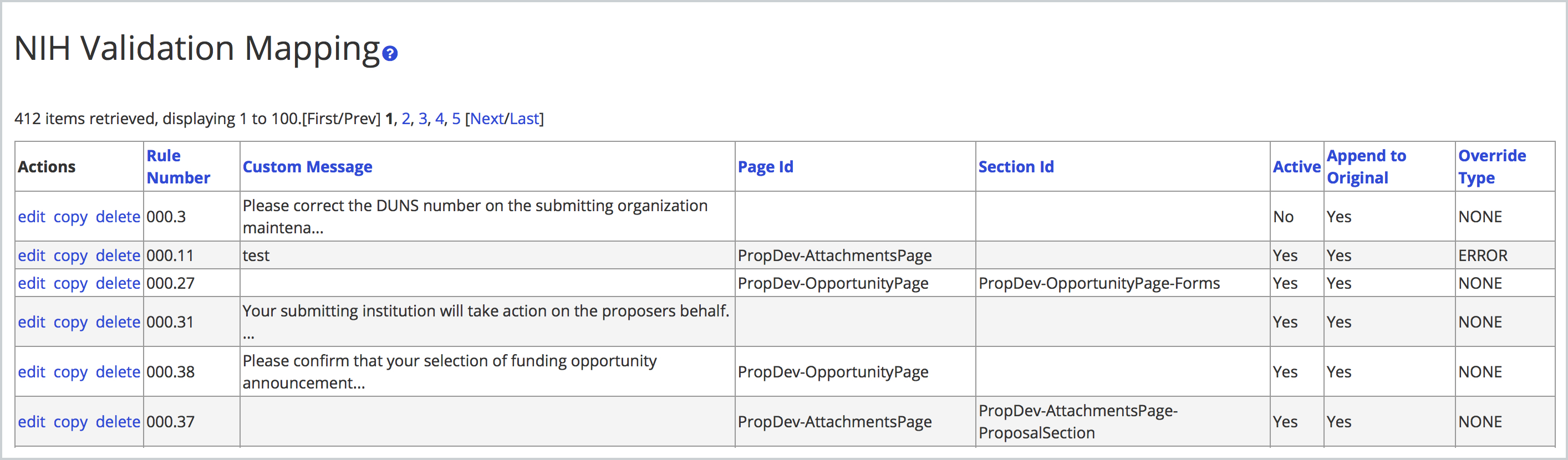
- Rule Number: The rule number associated with the NIH validation - all current validations and Rule Numbers can be found on NIH website: https://grants.nih.gov/grants/ElectronicReceipt/validations.htm
- Custom Message: The custom validation text you want to display to the user - also this field allows html markup language so you could insert a URL if you wanted in your validation message.
- Page ID: The tab you want to take the user when they click the 'fix it' link. Please note that the Budget specific Page IDs should not be used; if you want to direct to the Budget you'll need to use the PropDev-BudgetPage.
- Section ID: The specific section within the chosen page/tab you want to take the user when they click the 'fix it' link. Please note that the Budget specific Section IDs should not be used; if you want to direct to the Budget you'll need to use the PropDev-BudgetPage Page ID which will default use of the PropDev-BudgetPage-Collection Section ID.
- Active: Whether the Validation mapping is active and should be used by the system.
- Append to Original: You can choose to maintain the existing NIH validation message and simply append your custom text to the end.
- Override Type: There are the below four options to configure how the validation is handled in the proposal.
- ERROR: If the validation from NIH is a warning you can make it a hard error.
- NONE: No change to how the validation is handled from NIH.
- SUPPRESS: If you want to ignore the validation entirely you can use the suppress option to not display to the end user in the proposal. This can be used for erroneous errors coming from NIH inappropriately so it won't hold up the submission.
- WARNING: If the validation from NIH is an error you can make it a warning instead so it doesn't hold up routing.
Many of the NIH validations are already listed in this table for adjustment but they don't have to be in the table to fire in the proposal. If there is a validation rule that is not present in the table that you are receiving in a proposal and want to adjust you will need to create a new rule with the exact rule number that matches what displays in the validation service (i.e. 010.2.2, etc.). More information on all current eCommons validations can be found at the eRA System website:
https://era.nih.gov/applicants/system/validations.htm?q=applicants/validations.htm
Comments
0 comments
Article is closed for comments.