
Overview
The Organization maintenance document is used to create new and maintain existing Organizations used for the Proposal Development, Institutional Proposal, Subaward and Award modules in Kuali research. Organizations are used as the Sub-recipients in all modules for outgoing subcontract work for a project. For example, an Organization can be added to a Proposal Development record under the Organization & Location tab to track outgoing subawards in the proposal. If a subaward is added to the detailed budget in proposal you will also lookup/return an entry from the Organization table.
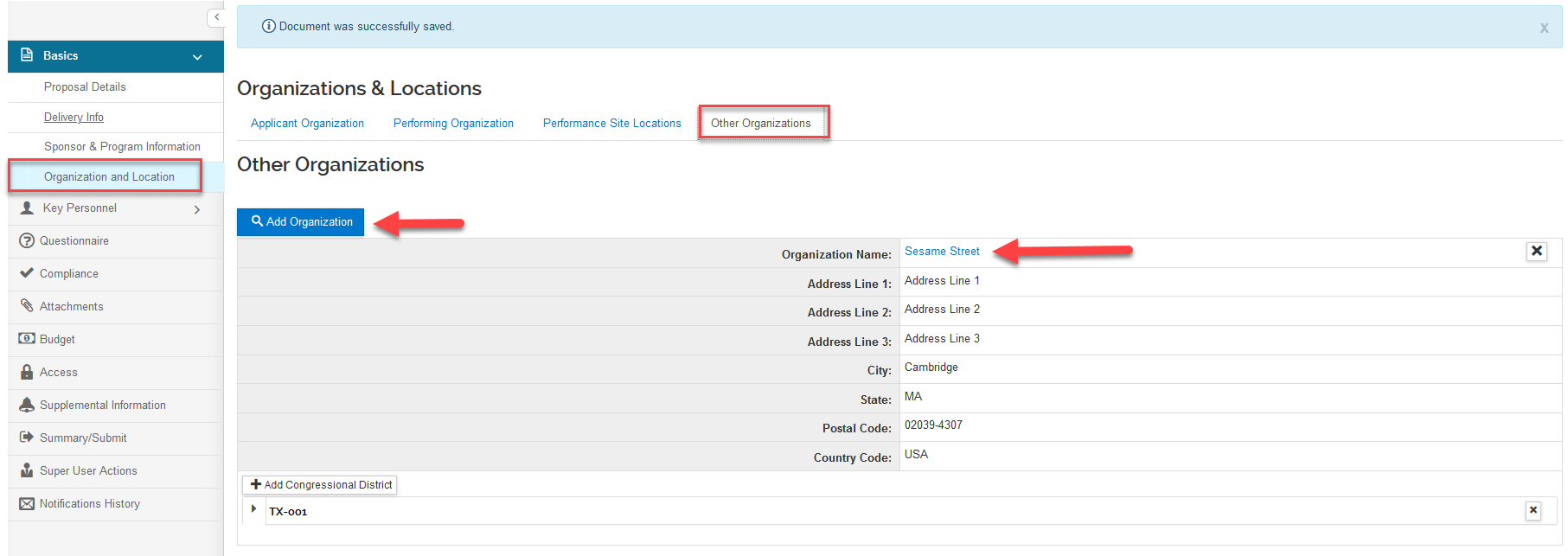
A popup window with additional details about the organization can be reviewed by clicking on the Organization Name hyperlink within the proposal development record and any other module so you can preview the Organization information when reviewing. This allows you to track the necessary information in the Organization record needed for sub recipient monitoring. Below outlines how to create and maintain the sections of the Organization records in the maintenance table.
Note: the Organization table is different from the Sponsor table in that typically the Sponsor table has less information and is for agencies you may be submitting proposals but may not have ever had funding from so the information is minimal. The Organization table is for organizations that the institution has issued a subcontract to so more information is desired to track for these entities. Often, you will have the same institution in both the Sponsor and Organization tables.
Organization
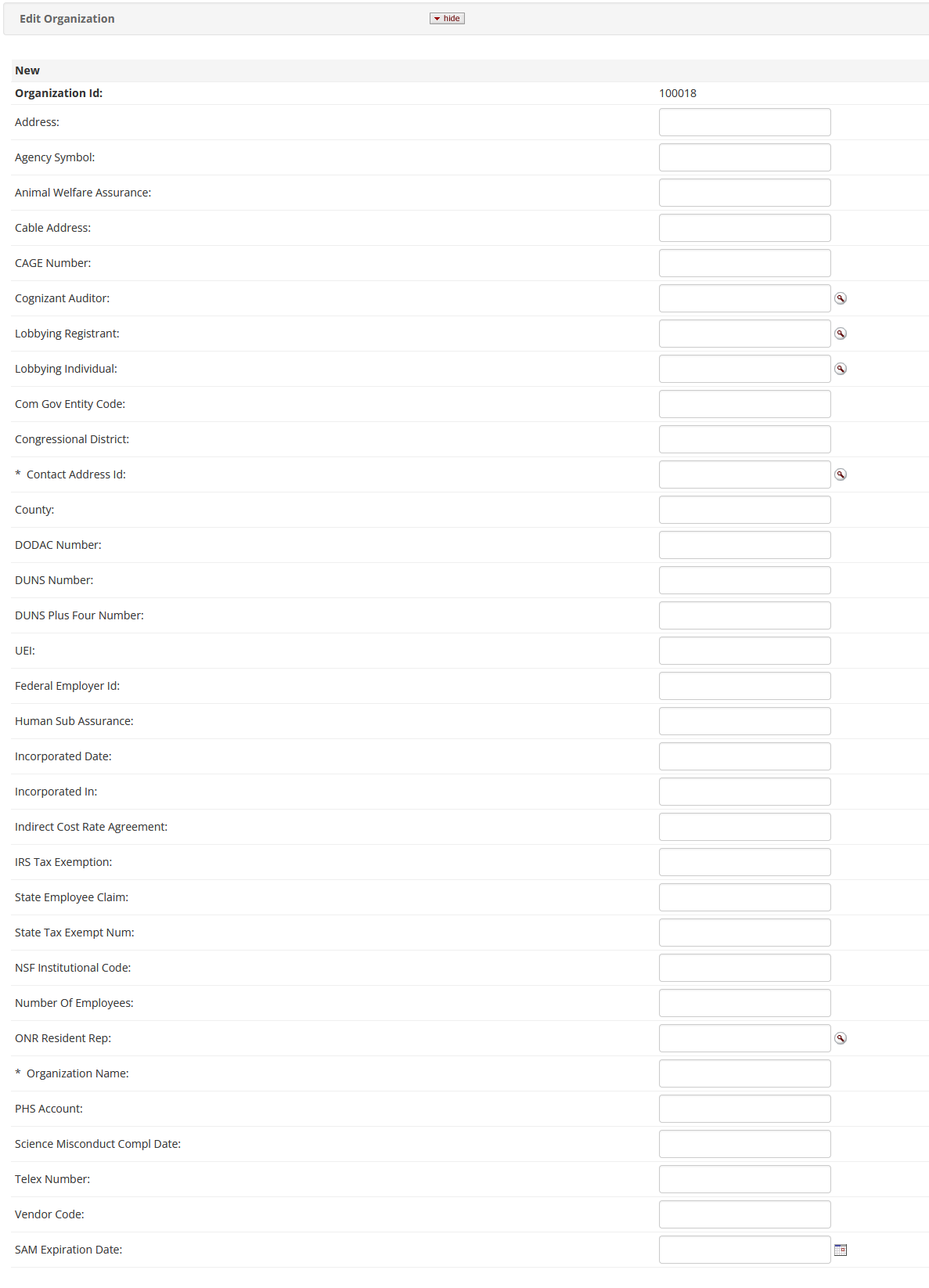
When editing or adding new Organization Type the fields below are available to track important information about each organization. Some of this information also carries forward into the record where the Organization is linked.
Organization Type
The organization type is pulled from the Organization Type List table and is used to specify the type of organization for federal sponsors and also used for S2S Grants.gov form population for the applicant Organization (000001).
Organization Audit
Multiple audits for an organization can be added to each organization. The fields for this each audit include the Fiscal year the audit was performed, the Audit Accepted Type (configurable via the Organization Audit Accepted Type table), and additional Audit Comments your institution would like to include.
Organization Indirectcost
Use to add or update multiple indirect cost rates for an organization. This information also has s2S Grants.gov form mapping for the applicant Organization (000001).
Organization YNQ
There are out of the box questions available for Organizations or you have the ability to configure your own questions that you would like to have answered for each organization. These questions are configured using the 'Yes/No Questions' maintenance table; specifically those that apply to Organization. When creating the Yes/No Question you have the following options:
- Question Id: where you can assign the ID for the question; must be unique
- Applies To: select from the dropdown where this will apply - please, note Organization must be selected for this use case. Also, the others are typically no longer utilized.
- Status: Select if the Yes/No Question is active; only active questions will appear in the Organization record.
- Effective Date: Date selector to chose when the question will go into effect; typically this is left blank.
- Question: Text area where you can type the question.
- Valid Answers: The type of response options in the question - only options are 'Yes, No' and 'Yes, No, N/A'
- Explanation Required For: Allows you to require the subsequent explanation field based on the response of the initial question.
- Date Required For: Allows you to require the subsequent date field based on the response of the initial question.
- Group Name: Where you can categorize the questions; this can be left blank.
- Sort ID: Allows you to control the sort of the questions.
There is also the ability to add an explanation, policy, and regulation via to YNQ Explanation panel which for Organization questions will display in the separate window if the inquiry link of the question is clicked.
Note: the Yes/No Questions should not be confused with the Questions table which is different and specifically used in conjunction with the Questionnaires in Proposal Development.
Notes and Attachments
This is a place where you can store attachments for the Organization to help in subrecipient monitoring (i.e. F&A rate agreements, Audits, etc). These attachments can be viewed in the Organization record or within the inquiry screen from the proposal, award, subaward, etc.
Note: In order to add Notes or Attachments the user modifying the Organization record must have the "View Note / Attachment Kuali Document" permission.
Related Documentation/Functionality
- Proposal - Organization & Location
- Proposal Budget - Subawards
- Subaward - Subaward Tab
- Parameters - Allow_Applicant_Organization_Change
- Parameters - AUTO_GENERATE_ORGANIZATION_ID
Comments
0 comments
Article is closed for comments.