
Overview
The Kuali Pre and Post Award modules track a grant across several stages of it's life cycle. A Proposal Development document tracks a proposal while it's being written and refined. An Institutional Proposal tracks proposals that were submitted to the sponsor, and any actions taken on them between submission and funding. The Award module tracks grants from the time they are funded until they are closed out. Conflict of Interest regulations do not see these steps as separate projects, and so the COI system needs to be able to associate declarations and dispositions at one stage of this process with the later stages. This can be accomplished by turning on the Disclose once at PD/IP stage and have the disclosure carry over to award feature described in the COI - Configuration - General Configuration article. For information on how to display all linked projects in the disclosure document please see the COI - Templates - Project Gadgets article.
Declaration and Disposition Flowthrough
When a Reporter discloses on a Proposal Development document and that disclosure is then dispositioned and approved, the Disclose Once function will transfer their disclosure to the linked Institutional Proposal document when the Proposal Development document is submitted to sponsor. This transfer will include any questions the reporter answered about that specific project, such as declarations or additional Project Questionnaire forms such as a 700U form. When that Institution Proposal funds an Award document the declarations and dispositions will then be transferred to the award.
This handoff creates a priority within the system. The project that will appear in a reporter's project list will always be the "highest" project type per the descriptions below:
- Proposal Development: This is the lowest project type. These projects will only appear on a disclosure if they are not linked to any other projects in the system.
- Institutional Proposal: If a Proposal Development document is linked to an Institutional Proposal than the IP will display on the disclosure, and the IP status will define if the project requires disclosure. So if an IP is Pending the project will still display on new disclosures, but if the IP is updated and put in a rejected status this project will no longer display on new disclosures. This project will only display on the disclosure if it has not yet been funded by an Award document.
- Award: If a project includes an Award it will always be treated as the primary project document. The Award status will define if the project requires disclosure. So if an Award is Active the project will still display on new disclosures, but if the Award is updated and put in a Closed status this project will no longer display on new disclosures.
Note: The behavior above requires the final status of each project type be required. In Proposal Development this means that the following statuses must be required for data to pull forward to Institutional Proposal. If these statuses are not marked as required in your Proposal Development project rules then the Proposal Development document will display in the linked Project gadget on the associated Institutional Proposal project, but the declarations, project questionnaire answers, and dispositions will not flow forward from the Proposal Development document to the Institutional Proposal document:
- Approved and Submitted
- Approval Pending - Submitted
- Approval Not Initiated - Submitted
- Approved Post-Submission
In order for disclosure and disposition data to populate from Institutional Proposal to the Award module the Funded status must be marked as required in the Project rules. If funded is not marked as required in your Institutional Proposal project rules then the Institutional Proposal document will display in the linked Project gadget on the associated Award project, but the declarations, project questionnaire answers, and dispositions will not flow forward from the Institutional Proposal document to the Award document.
Display in Disclosure
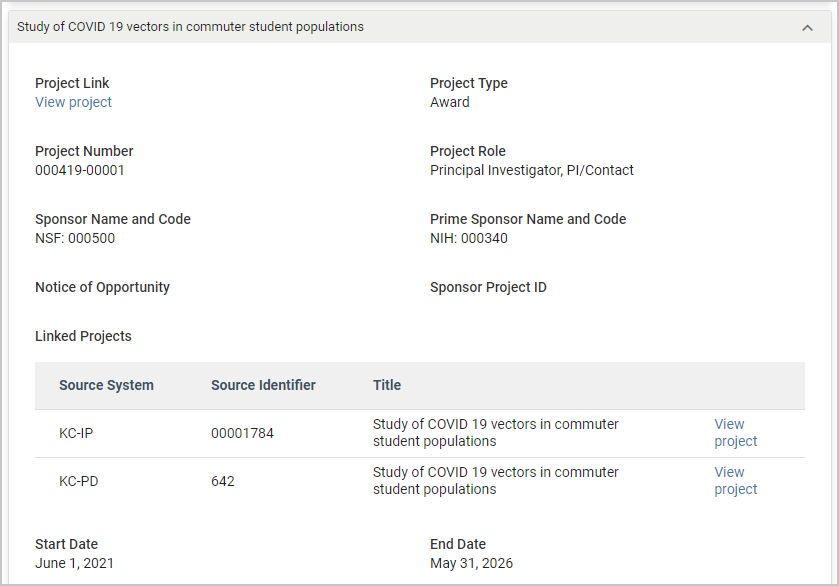
If you include the Linked Projects gadget in your Project Questionnaire or Project Declarations card list then it will display all previous documents associated with your project. So an Institutional Proposal will display the Proposal Development it was created from, and an Award document will display all Proposal Development and Institutional Proposal documents linked to the Award. For more information on the linked project gadget please see the COI - Templates - Project Gadgets article.
Statuses
Using the Declare Once feature will allow the COI system to treat all associated grant documents as a single project in a disclosure. This means that there must be a single status to define if the overall project requires disclosure. The system identifies the primary project according to the hierarchy above. So the project that displays on the disclosure is also the project that will be evaluated for requiredness. This facilitates a few different business process dynamics in COI.
If an Institutional Proposal that is currently the primary document in a Declare Once project is rejected then the project will no longer display on new disclosures, even though the original Proposal Development is still in a status marked as required.
If an Award that is currently the primary document in a Declare Once project is closed out then the project will no longer display on new disclosures, even though the Institutional Proposals associated with the project are still in Funded status.
This allows the terminal actions on a grant such as rejection or closeout to apply to all documents associated with the grant.
Comments
0 comments
Article is closed for comments.