
Overview
You can now enable display of Kuali Protocols in the Compliance tab of Proposal Development, Institutional Proposal, and Award modules. When enabled and you utilize the Funding Source gadget in the protocol template then when the protocol links to either a Proposal, Institutional Proposal, or Award it will then display in the Compliance section of that record. This will display in the Linked Protocols section at the top of the Compliance section - users with the appropriate permissions can open the linked Protocol Number to view in Kuali Protocols.

This Linked Protocols section is display only and does not map to S2S Grants.gov forms or meet any other local compliance requirements so you will still need to manually add Compliance entries for those purposes.
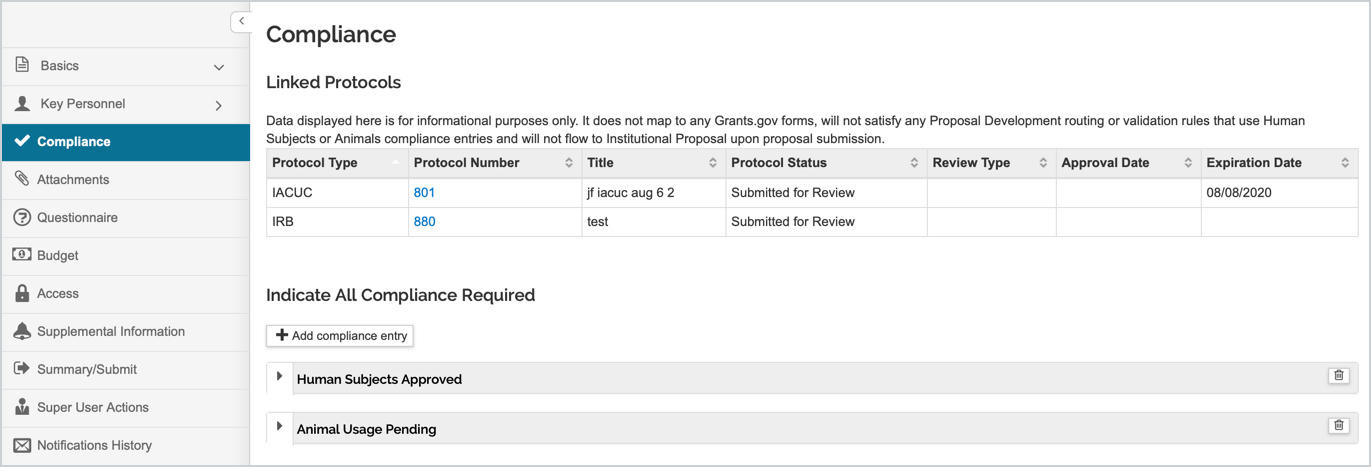
More information on the Compliance tab in the Proposal can be found in the Proposal - Compliance article.
Configuration
The Protocols_Linking_Display_Enabled parameter allows you to enable the display of Kuali Protocols in the Compliance tab of Proposal Development, Institutional Proposal, and Award modules. When enabled and you utilize the Funding Source gadget in the protocol then when the protocol links to either a Proposal, Institutional Proposal, or Award it will then display in the Compliance section of that record. This will display in the Linked Protocols section at the top of the Compliance section - users with the appropriate permissions can open the linked Protocol Number to view in Kuali Protocols. More information on the Funding Source gadget can be found in the Compliance - Form Gadgets article.
Comments
0 comments
Article is closed for comments.