
What can you expect?
A new dashboard card focused on providing transparency and easing the workflow of negotiations and associated activities will soon be available. Initially, this card will populate with documents for ‘In Progress” negotiations when the logged in user is the Negotiator or the Principal Investigator on an associated document. Both the negotiator as well as the PI will appear in the card to help clarify the primary people involved.
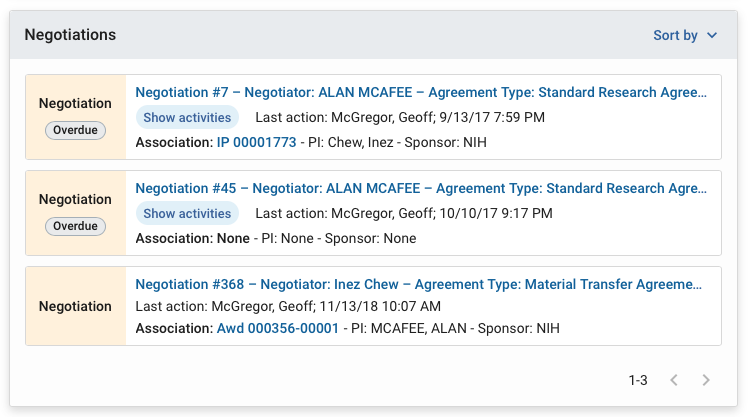
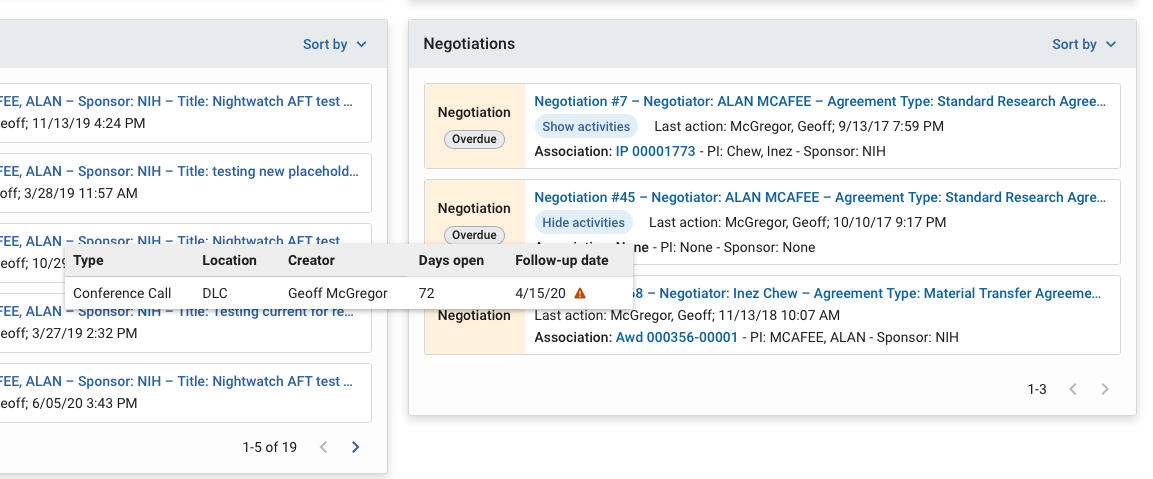
Links on the card can direct the user to the negotiation or to the associated document, such as an award. Navigation links will still rely on system permissions. If your institution utilizes the follow-up dates functionality in negotiation activities, the new card will also indicate if the follow up is overdue. You can use the ‘show activities’ for a quick snapshot of activity type and location information to better understand the status without having to navigate into the full negotiation. You can see more information on all the cards in the ‘Dashboard Home’ article.
How will these changes roll out?
The Institutional admin can enable the functionality for their users by using the dashboard configuration option to toggle on the Negotiation Card. Once you have made the card available, your end users may customize their dashboard experience by turning the card off in the dashboard show/hide cards button. If you want to see a preview while Kuali is still testing, you can follow the above instructions in your SaaS STG instance or in the community sandbox environment, early next week.
When can you expect these changes?
Kuali anticipates that these changes will be available in production next week.
Comments
1 comment
Need to add other status codes (such as "Ready for Award Setup") to fulling use this function.
Please sign in to leave a comment.