
In our last correspondence, Kuali announced our intention to move the Purchase Order ID field from the Subaward tab to within the transactions section in History of Changes on the Financial tab. Based on user feedback in the Subaward Working Group we discovered that the Purchase Order number is often not known upon the initial setup and it could change during the life of the subaward. This change will allow users to add as many Purchase Orders as necessary for the life of the subaward. Kuali has scheduled the change to appear in SaaS production environments as of Thursday July 25th. Below is important information to help you prepare for the release of this change.
Location
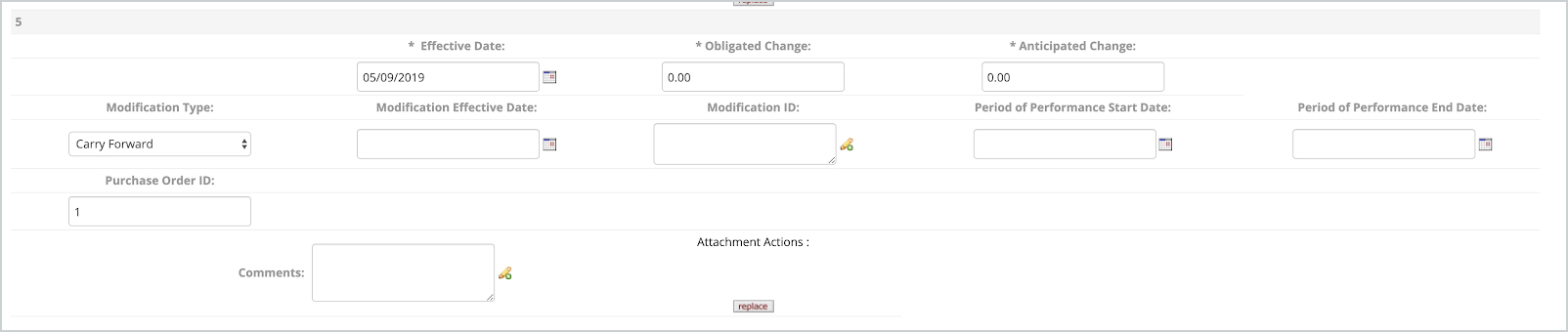
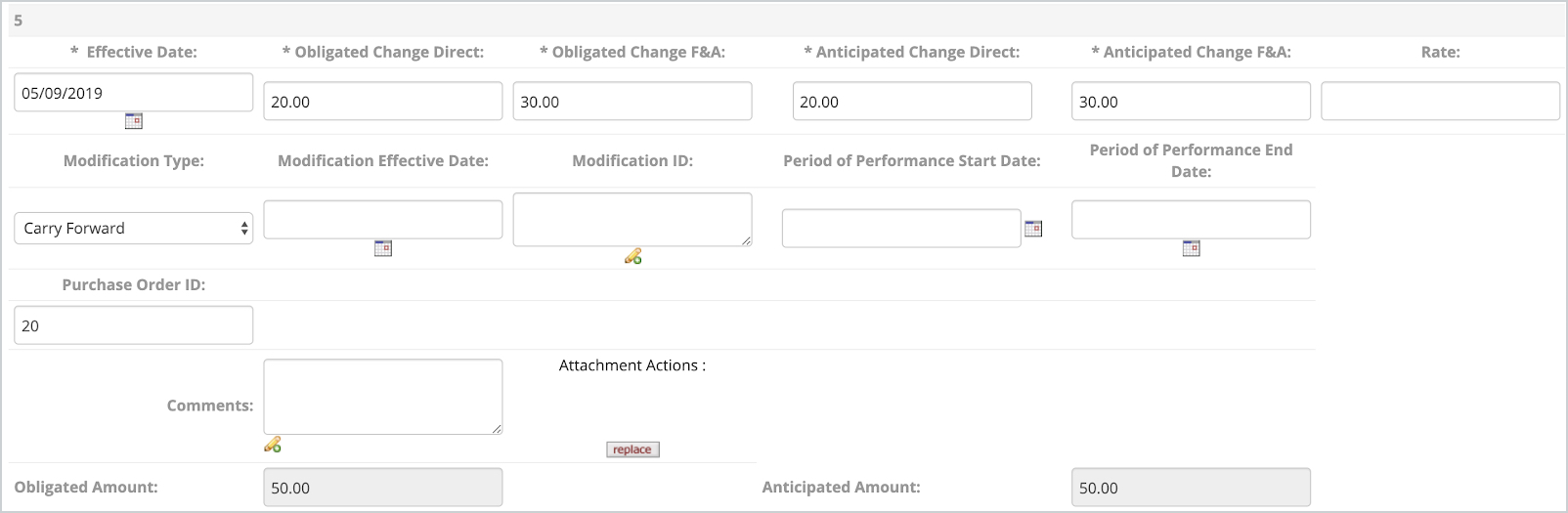
Since configuration allows customers to choose to use the Financial History of Changes to capture anticipated and obligated amounts as totals OR direct and indirect, the Purchase Order ID cannot be displayed clearly on the current row layout. Therefore, Kuali is adding a new row in the History of Changes. Here are examples of those two scenarios. You may use these to update any needed local documentation in advance of the release.
Financial History with Total Obligated and Anticipated fields:
Financial History with Direct/F&A Obligated and Anticipated fields:
You Current Data
Kuali is providing a script to move any current Purchase Order ID entries to the new location.
- SaaS customers - the script will apply automatically in your production environment at the same time as the code. The scripts are tested in your STG environments to ensure that there are no data or configuration conflicts.
- Self-hosted customers - the script will be bundled and available to you in the code
Details of the script behavior - Purchase Order ID entries are moved to the new History of Changes field for Purchase Order ID.
- If you have existing History of Changes rows, the field will be populated in the most recent entry by default.
- If there are no History of Changes rows, the script will ADD a row, with the required fields of *Obligated amount as zero (0) *Anticipated amount (or DC/ IDC amounts) as zero (0) *Effective Date will first attempt to be completed with the subaward Execution date, if Execution date is null then will try to fill with the subaward start date, if both of those are null it will fill with 1/1/1900. As of last month, Kuali added the functionality to enable users to make edits to the information on the history of changes. Users may modify any incorrect entries as needed after the script was run.
A Note about Searching by Purchase Order
When searching by Purchase Order ID, Kuali will return a subward in the results where the Purchase Order ID appears in any of the History of Financial Changes rows.

Removing Purchase Order ID Requiredness
PO numbers are not necessarily known when subawards are initially set up, and so Kuali has made the new Purchase Order ID field NOT REQUIRED. Institutions wishing to make it required may use the Data Dictionary Override or KRMS. The KRMS function will validate that the active record (last entry) in Subward Financial -> History of Changes includes a Purchase Order Number. In the KRMS proposition builder, use the function: Check if Purchase Order on the Active Entry is not null.
Note for Technical Personnel
The purchase_order_num column is now moved from the subaward table to the subaward_amount_info table. The migration moved the current purchase_order_num from the subaward table to the latest record associated in the subaward_amount_info table. We will remove the column purchase_order_num from the subaward table in a few more weeks.
For those utilizing our APIs, the SubAward API was changed to support the movement of the field purchaseOrderNum. Now, for creating a new subaward with a purchaseOrderNum it needs to be specified in the collection attribute subAwardAmountInfoList.
Comments
0 comments
Please sign in to leave a comment.