
Overview
As a researcher you can submit a request to close a protocol once research activities have concluded. When this action is taken a form, configured by your institution will populate at the top of your protocol document. Once you have completed the Closeout form and submitted the request to your compliance office your compliance admin will be able to review your request and closeout your protocol. As an IRB or IACUC Administrator you can configure your Closeout form in the Protocols - Templates screen.
Request to Close
On an approved protocol the Request to Close button will be available if you need to request closure of a protocol. This button will only be available to those granted full access to the protocol or an admin can initiate.
Upon clicking the Request Close you will be required to fill out more detail about the closeout of your project. Once you complete the form defined by your institution and click submit it will initiate a request to close and submit it to your compliance administrator.
Reviewing a Closeout Request
Once a Closeout Request has been submitted to the compliance office the compliance administrator can take any of the actions available performing Administrator Review on protocol submissions. Closeout actions do not version when they are returned to the researcher, so you cannot compare to previous when a closeout is resubmitted.
When review is complete the compliance administrator can complete the closure by using the Close button on the right hand actions panel.
Changes to Manage Protocols
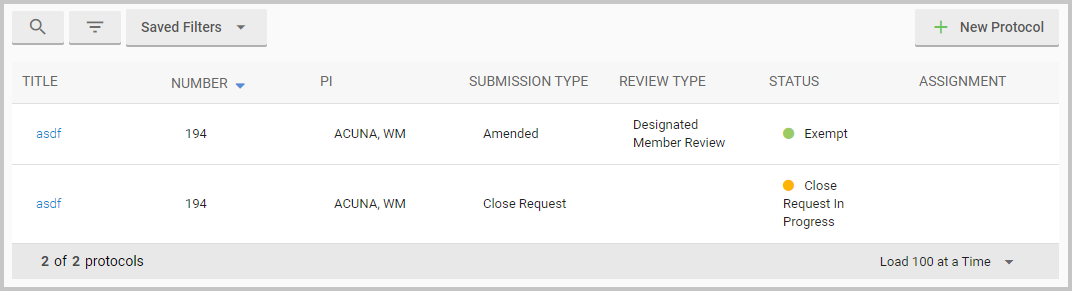
Once you've initiated a Closeout action your closeout submission will appear in the Manage Protocols screen along with the most recent approved version of your protocol. Once your protocol is closed out or if the closeout request is abandoned it will no longer appear in the Mange Protocols screen.
Comments
0 comments
Article is closed for comments.