
Protocol approval, continuing review, and expiration dates play a large role in facilitating an efficient and accurate workflow for both Researchers and Administrators. Oftentimes, the initial Approval date can reflect a selection that was either inadvertently selected by the administrator or a protocol may have been approved prior to its review at a committee meeting. Whatever the action necessitating this change may be, Kuali Protocols has introduced functionality that will allow administrators to adjust the dates corresponding with a protocol’s approval in order to ensure protocol information is accurate and up to date. We've enabled this functionality in all customer STG/SBX environments and will be enabling in PRD on Monday 1/18/21.
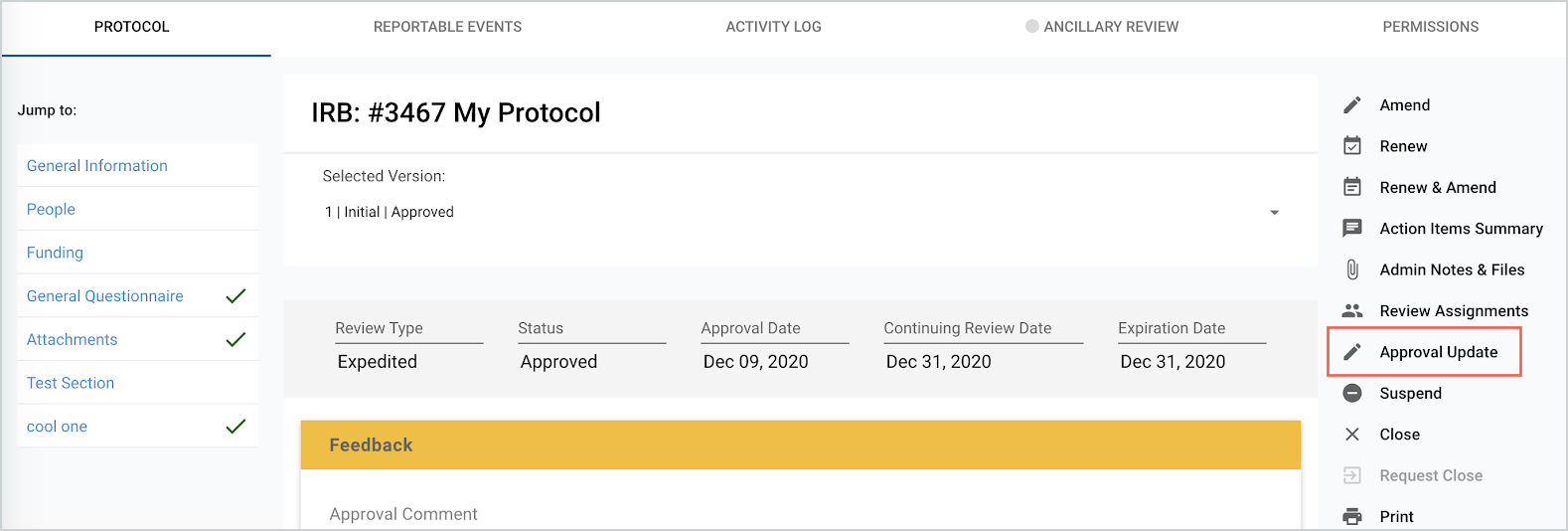 In the screenshot above, the “Approval Update” button will appear in the right hand menu on the most recent ‘Approved’ version of the Protocol.
Approval, Continuing Review, and Expiration dates are all particular dates that are associated with a protocol’s approval action. These dates can now be edited on post-approval actions to reflect an updated protocol timeline via the “Approval Update” button. This “Approval Update” button is only available to users with the IRB Administrator or IACUC Administrator roles.
Once the “Approval Update” button in the right hand menu is selected, an Admin will be presented with a modal to allow for changes to be made to either the Approval, Continuing Review, or Expiration dates, as well as the Approval Comment. Any change made here will result in a new correspondence letter for the research staff and an entry in the Activity Log.
Please note: If the Protocol has already Expired based on the initial Expiration Date entered then changing the Expiration Date via Approval Update will not automatically update the protocol status back to Approved, Exempt, etc.
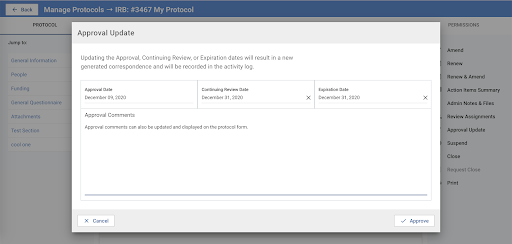
The image above displays the new ‘Approval Update’ modal. Similar in design to the original approval modal, this modal notes that any changes made are recorded in the activity log and result in a new correspondence letter.
If you have any questions on the above please submit a support ticket.
Comments
0 comments
Article is closed for comments.