
Overview
The Proposal Hierarchy functionality in the proposal module of Kuali Research allows a user to create a series of proposals that are linked and roll up to the parent/main proposal. They could be used to isolate different budget rates, tasks, personnel, or other requirements. Hierarchy is used to consolidate the proposals to appear as one proposal which is routed and submitted as the single proposal in Kuali Research and to the sponsor.
Proposal Hierarchy Use Cases:
- Multiple Units or PIs / Investigators
- Combination of F&A Rate Variations (e.g. K99/R00)
- Phased or Tasked Projects
- Optional Budget Periods
- Preparation for Post Award Accounts
- Delegate preparation to different users
User may create a hierarchy or view existing hierarchy information by using the Hierarchy button in the top header of the proposal:

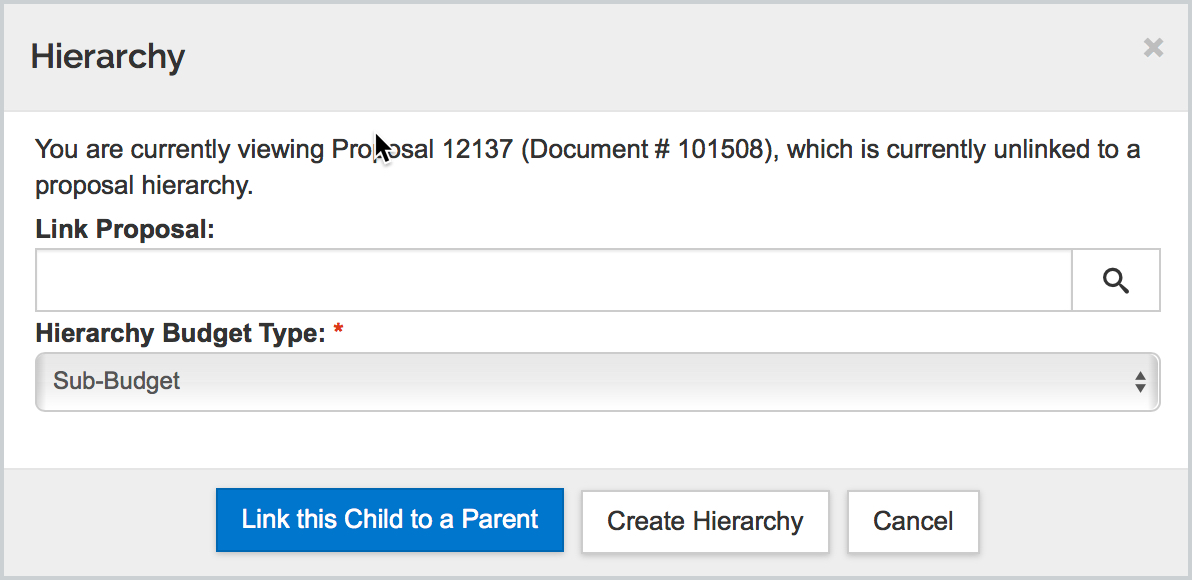
Once clicked the Hierarchy window will give options on creating and linking to existing proposals. If you want to initiate a hierarchy you can select 'Create Hierarchy' with Sub-Budget type which will create a parent to this proposal (as shown below). This tool makes the existing proposal the 'child' proposal and copies all the information in the created proposal and automatically links the initiated proposal as a ‘parent.’ If you wish to link this proposal to another existing proposal as a child you can lookup the desired parent proposal and chose Sub-Budget and then 'Link this Child to a Parent'.
Within the Hierarchy tool you can:
- Initiate a hierarchy which will create a parent (making the current proposal a child proposal)
- Search from the child proposal and link to a parent.
- Search from a parent proposal and link child proposals.
- Synchronize all child data from the parent.
- Synchronize child data from one proposal to the parent
- Unlink a child proposal from the hierarchy – from the parent or from the child.
Proposal Hierarchy Basic Concepts
- Proposal Hierarchy combines multiple proposals/ budgets to submit as one
- A hierarchy consists of two levels:
- one parent proposal, and
- one or more child proposals
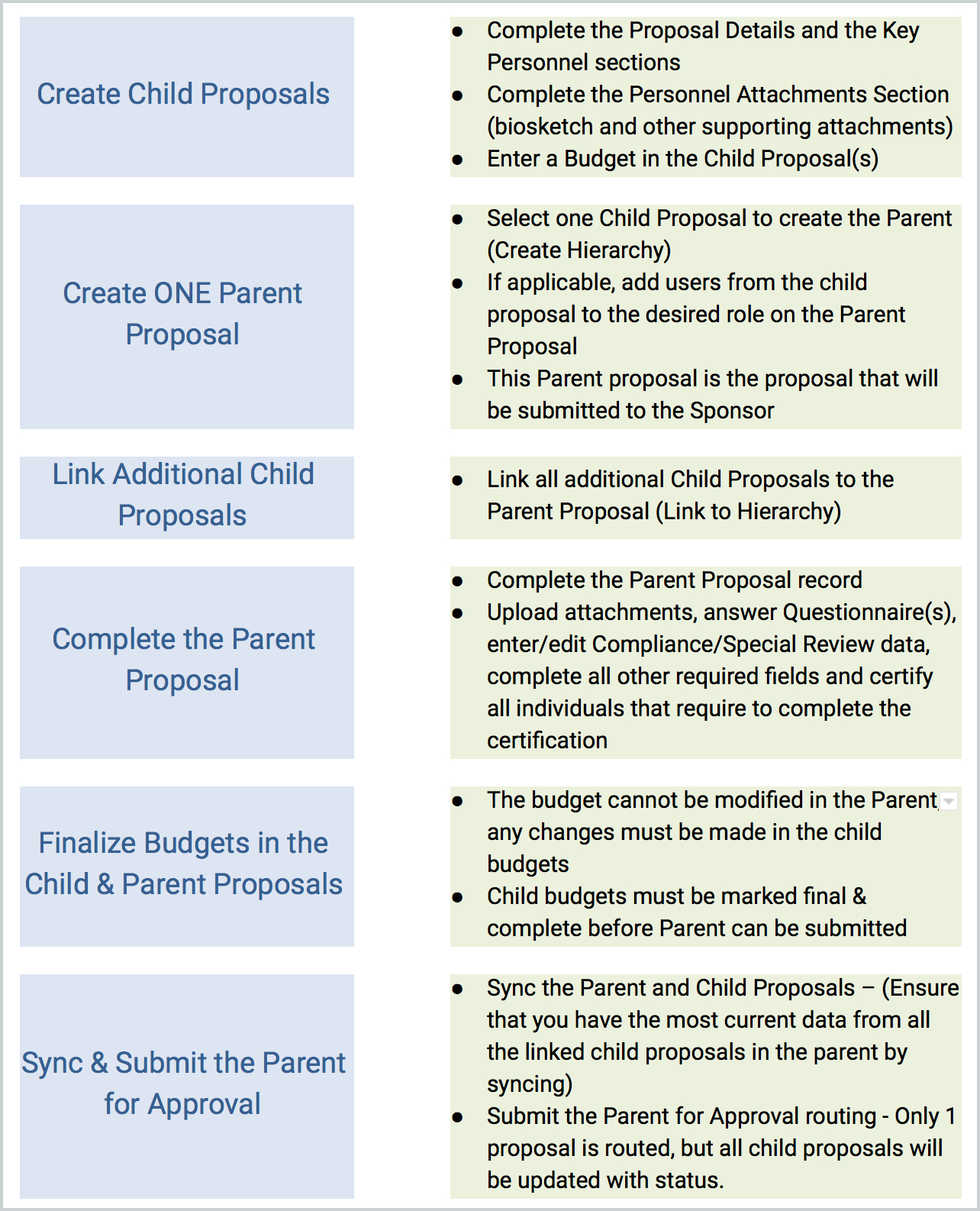
- The parent is created from a child proposal, and then other child proposals are linked to the hierarchy.
- The PD/PI Contact of the child proposal that created the parent is automatically the lead PI of the parent proposal and the hierarchy.
- The lead unit (department) of the child proposal that created the parent will be the lead unit (department) of the parent proposal.
- Before you create the parent proposal, decide which child proposal you will use to create it.
- The resulting group is submitted as a single proposal.
- Certify the investigator(s) and answer the Questionnaires in the parent.
- For routing and master data, KR will always reference the parent (top level) proposal as the official version.
- Most often Child Proposals are used for budgets and proposal personnel information. Best practice is to upload the attachments and enter compliance/special review data in the parent proposal. In addition, as mentioned above you can only certify the investigator(s) and answer the Questionnaires in the parent record.
- Changes to the Budget are made in the child proposals. Those changes are then synced up to the parent proposal. Changes to the budget cannot be made directly in the parent proposal.
- Changes to Personnel Details are made in the child proposals. Those changes are then synced up to the parent proposal. Changes to the Personnel Details cannot be made directly in the parent proposal unless the Senior/Key Person is listed in multiple child proposals.
- If an Investigator has been synced to the parent proposal, you cannot delete the Investigator in the Parent; you must delete them from the Child and then sync.
- Only works with detailed budgets within children proposal; summary budgets cannot be used to sync up to a parent budget.
Process Overview
Additional Information
- In order to create a Proposal Hierarchy or to link Child Proposals to an existing Hierarchy, the users should must have the Aggregator role on the Parent Proposal.
- Also, the Start and the End Dates of the proposal should be the same for the parent and all of the children linked in the same hierarchy.
Skip the following sections/functions in the Child Proposal
- Do NOT certify the investigator (This information will not sync up to the parent therefore this must be done in the parent proposal)
- Do NOT complete the Investigator Credit Split (This information will not sync up to the parent therefore this must be done in the parent proposal)
- Do Not connect to Grants.gov
- Do Not answer the Questionnaire (This information will not sync up to the parent therefore this must be done in the parent proposal)
Entering Data and Syncing the Proposals:
|
Data Location |
Enter Data In (Parent or Child Proposal?) |
Parent Updated When: |
|
|
Creating Parent |
Linking or Syncing |
||
|
Basics > Proposal Details, Sponsor & Program Information |
Either Parent or Child |
Yes |
No |
|
Basics > Organization and Location |
Parent |
Yes |
No |
|
Basics > Delivery Info |
Parent |
Yes |
No |
|
Basics > S2S Opportunity Search |
Parent |
No |
No |
|
Key Personnel > |
Child |
Yes |
Yes |
|
Key Personnel > |
Parent |
No |
No |
|
Key Personnel > |
Parent |
No |
No |
|
Key Personnel > Person Details, Degree |
Parent if the person is in more than one child proposal. Child if the person is in this child proposal only. |
Yes |
Yes |
|
Supplemental Information |
Parent |
No |
No |
|
Attachments > Proposal Attachments Tab |
Parent Only, BUT: Child if the Attachment Type is used in only one proposal. |
Yes |
Yes |
|
Attachments > Personnel Attachments Tab |
Parent if the person is in more than one child proposal. Child if the person is in this child proposal only. |
Yes |
Yes |
|
Attachments > Internal Attachments Tab |
Parent or Child |
Yes |
Yes |
|
Attachments > Abstracts Tab |
Parent |
No |
No |
|
Attachments > Notes Tab |
Parent or Child |
No |
No |
|
Budget |
Child |
Yes |
Yes |
|
Budget details |
Parent for Total Cost Limit, Residual Funds, and UR Rate Type; Child for other data. |
Yes |
Yes |
|
Budget Status field |
Mark all Complete. Child proposals must be marked Complete before the parent is marked Complete. |
No |
No |
|
Modular Budget |
Parent |
No |
No |
|
Budget Justification |
Parent |
No |
No |
|
Subaward Budget |
Child |
Yes |
Yes |
Comments
0 comments
Article is closed for comments.