
Overview
When a protocol is resubmitted to a compliance office, or an amendment is ready for review it's critical that reviews can easily track changes to the protocol. The Kuali Protocols system allows a reviewer to compare a protocol version to any other version in the protocols history to facilitate multiple types of revision review.
Choosing a Version for Comparison
While reviewing a protocol as an admin or a reviewer you can click the Compare Versions checkbox at the top of the screen. When you check this option a new Compare a Version dropdown will display where you can indicate which version of the protocol you'd like to compare to. The Protocol version selected in the Selected Version dropdown is the the version that is currently loaded.
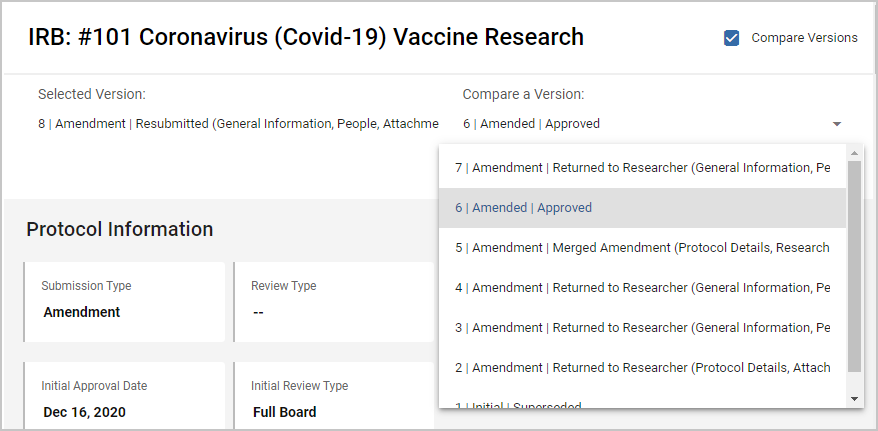
By default the system will compare the Selected Version the version immediately preceding it in the protocol history. So if you are in version 8 the default will be to compare it to version 7. While this will be the appropriate comparison in many cases if you are using the multiple pending amendments functionality, or if an amendment has been sent back for revision multiple times you may want to compare your submission to a different version in the history. You can choose which version you want to compare to by selecting a different option in the Compare a Version dropdown list.
Tracking Changes
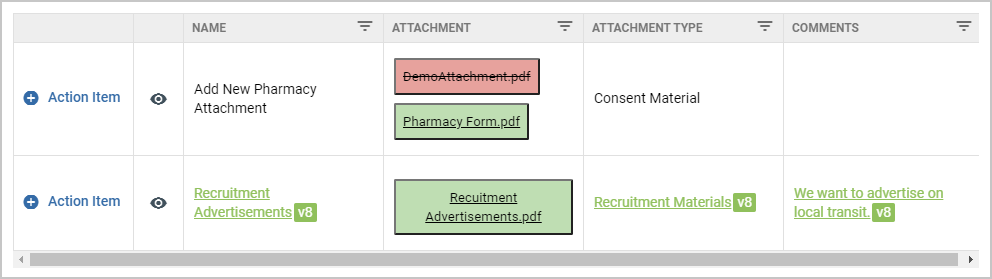
Once you've turned on Compare Versions and selected the version of the protocol you want to compare the current submission with you will see changes highlighted throughout the protocol. Data that's new in your current submission will be highlighted in green, and data that's in the submission you are comparing to but not in your current version will be struck out and highlighted in red. While comparison is turned on you will be able to access attachments from either of the two versions you are comparing.
Note: If you have dialog lists on your forms you will need to open each dialog list to see if there are changes to fields that don't display in the table by default.
Comments
0 comments
Article is closed for comments.