
The ability to print Subaward information into FDP templates is being modernized by utilizing the Kuali PDF Tool to power the mapping and printing of the PDF forms.
The Federal Demonstration Partnership (FDP) created FDP Subaward templates to expedite and streamline federal subaward review among FDP member institutions and non-FDP members alike. We have been maintaining and updating to the most current versions of the Subaward templates as they are released on the FDP website (http://thefdp.org/default/subaward-forms/). Formerly, the process of printing data to the PDF forms included maintaining documents using a combination of XML and XSL files. This maintenance is a cumbersome process that requires a lot of work to fix and maintain the XSL files. For printing, we would put the record data into an XML file format that was only used for printing these forms. The outcome of these XSL files was sub-optimal: a read-only PDF document that is a reproduction of the original form rather than the official PDF download, and users could only attach other PDF files rather than any file type.
Benefits of the PDF Tool
The PDF Tool has the benefit of quicker and more flexible maintenance of PDF generators. Maintaining the mappings is quicker than maintaining all the manual java code. It is easier to configure field information and update new versions of forms.
Using the PDF tool aligns our printing with our API REST endpoints. These endpoints and dataformats are maintained for other parts of our application as opposed to converting to XML for the sole purpose of printing the FDP forms using an XSL transform.
The PDF tool can support multiple mappings without java code changes which means that when there are changes to a form, these changes can be done by changing mappings through configuration rather than having to change code (“code-free” mapping). When there are changes to fields on a form, the PDF tool allows you to copy a single mapping, rather than creating a whole new form over again in java code. For example with System-to-System forms, Grants.gov will make one field change and release a whole new form and we have to copy all of the java logic over and over again. (Note that System-to-System support of the PDF Tool is planned for a later date.)
What changes for users?
FDP templates powered by the PDF tool produce flexible, fillable PDF forms. Once the new fillable forms are printed, the information in the fields can be manipulated on the form itself. A user will now have the ability to adjust any field, add information to fields, and update drop down selections. The forms are now the official forms rather than the xsl reproductions of the forms, so customers can be sure that the latest forms are updated as intended by FDP.
Rather than having to print out each section separately, the entire agreement can be printed at once. Any format of attachments can be included as an attachment and concatenated to the PDF printout whereas previously only other PDF files could be concatenated.
Because of the change to how we map these forms, customers will have the ability to customize field data on forms, for example by hard coding data or specific fields that will remain constant.
Finally, this functionality extends beyond FDP templates and can be used to support any type of fillable PDF form. If a form that a customer uses already exists, converting it to a fillable form will allow data to be mapped and subsequently printed.
How to print out FDP Forms in Subawards
There are a few minor user interface changes for picking forms to print. On the Subaward Actions tab, in the Print section, a user would select which template they intend to print from the selection box and click on Print. Multiple forms can be selected at once.

Previously, selections would be made from a drop down for Funding Source and on radial buttons or checkboxes in the FDP Template section for Cost Reimbursement or Bilateral Amendment templates, Sponsor Attachments for federal agencies, FDP Template Attachments, and Subaward Template Attachments. The Sponsor Attachments are made obsolete because the information to fill Attachment 2 in the Cost Reimbursement Template is filled with Sponsor information from a maintenance table. These Sponsor Attachments will also be removed because they are on older versions of the FDP templates.
A few key things to remember: selections on the template information tab will populate a majority of the terms and conditions fields on the Cost Reimbursement Subaward Template. As well, there are some fields related to the award information that come from the active award listed in the Current Funding Source section. The accurateness and completeness of the information in those sources will affect whether or not information appears on the template.
Subaward Attachments will appear in the attachments section of the PDF file in the left hand panel which can be viewed by clicking on the paperclip icon.
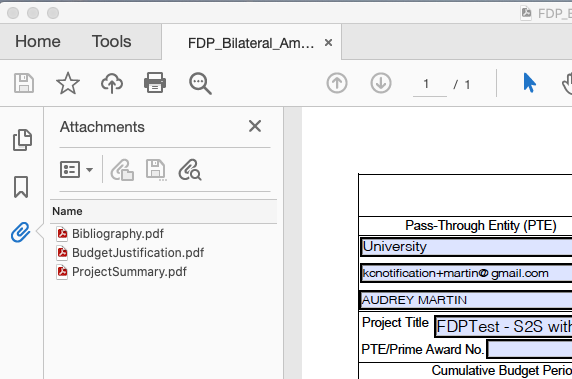
More information on using the FDP forms can be found in the Subaward - FDP Forms article.
Next Steps
The December 2020 Versions of the FDP Subaward templates have been mapped using our PDF tool and are ready to be deployed. In order to do so, we will activate the parameter Enable_FDP_Via_PDF_Service in all customer environments. If a customer environment has not yet enabled Enable_Subaward_FDP, we will activate this parameter as well so that the print section in Subaward is visible. In order to access the newest December 2020 FDP Templates: Cost Reimbursable Template, BIlateral Subaward Amendment Template, and Uniltateral Subaward Amendment Template, these parameters will need to be enabled.
As part of the rollout of the PDF Tool, we will be providing documentation in our Support Portal on how to utilize the tool locally in the near future. Also, on Tuesday February 23rd at 2:30pm EST, as part of Kuali Days 2021, there was a presentation on the PDF tool and how it works as applied to FDP Subawards Templates. If you were an attendee hopefully you were able to attend or you can watch the session recording which will be uploaded to the Kuali Days platform app soon. We also hope to possibly schedule training on how to use the mapping tool to configure fillable PDF forms.
In addition to implementing future enhancements to the PDF tool and printing in Subaward, our next phases will include implementation in other Sponsored Programs modules and applying the PDF tool to System-to-System forms.
If you have any questions or need assistance please submit a support ticket.
Comments
0 comments
Article is closed for comments.