
Summary
The proposaldevelopment.displayKeywordPanel Parameter allows institutions
to either display the Keywords field in the Proposal Development → Basics → Proposal Details section; or to not display that field.
The out-of-the-box parameter value for proposaldevelopment.displayKeywordPanel Parameter is TRUE, meaning that Keywords field will be displayed.
Valid Parameter Value(s)
The proposaldevelopment.displayKeywordPanel Parameter Value accepts a single value:
| Parameter Value | Description |
| TRUE |
to display the Keywords field |
| FALSE |
to NOT display the Keywords field |
Related Maintenance Table(s)
- Keywords
Related Parameter(s)
- N/A
Example
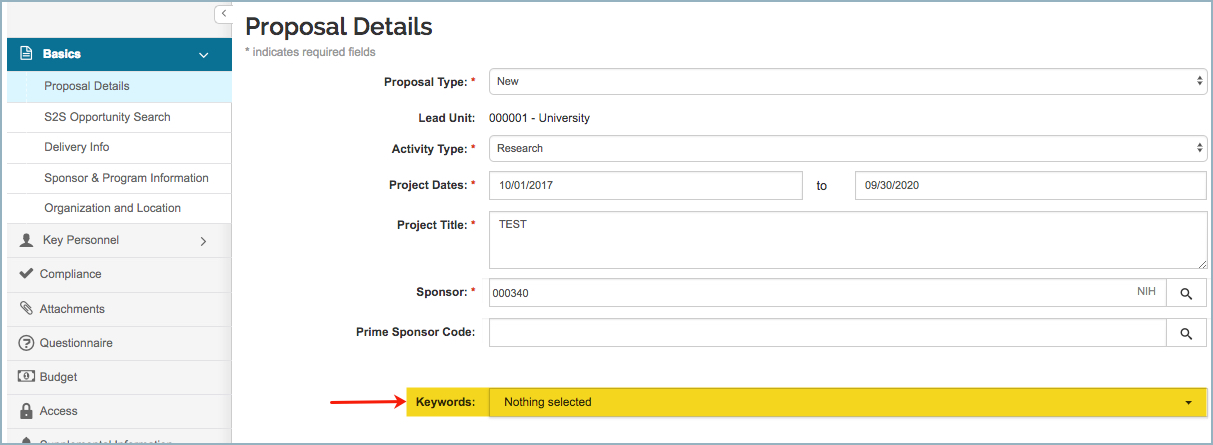
If the proposaldevelopment.displayKeywordPanel Parameter is set to TRUE, then in Proposal Development Basics → Proposal Details section, the Keywords field will display:
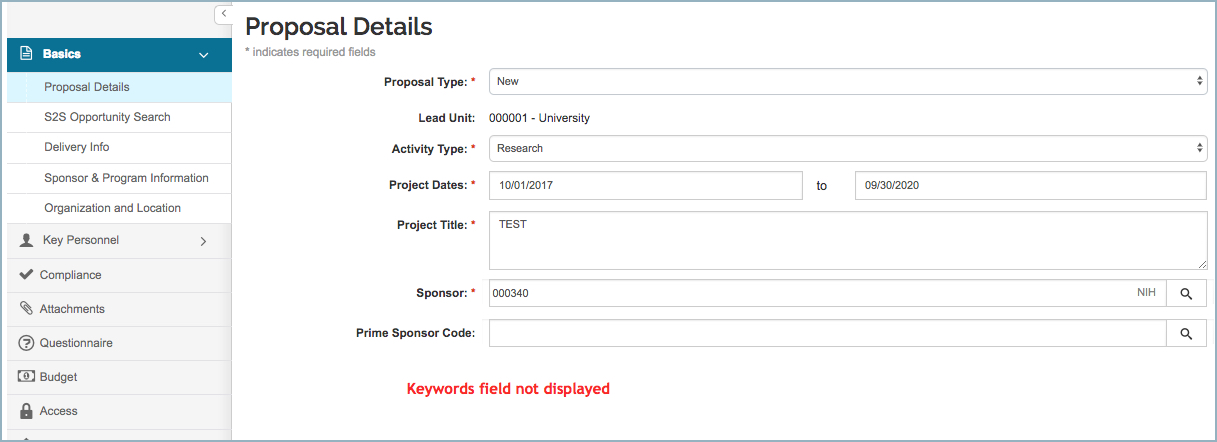
If the proposaldevelopment.displayKeywordPanel Parameter is set to FALSE, then in Proposal Development Basics → Proposal Details section, the Keywords field will NOT display:
Comments
0 comments
Article is closed for comments.