
Summary
The DEFAULT_BIOGRAPHY_DOCUMENT_TYPE_CODE Parameter allows institutions to define a document type code that the system will use to automatically upload a Biosketch when adding new users to a Proposal Development Document who already have an attached Biosketch file in their Person Extended Attributes.
Valid Parameter Value(s)
The DEFAULT_BIOGRAPHY_DOCUMENT_TYPE_CODE Parameter Value accepts a single value:
| Parameter Value | Description |
| <enter value> |
When modifying this parameter, institutions should input the numeric value of the Person Document Type that they wish the Biosketch to upload under (e.g. 1). The Person Document Type code can be obtained from the Person Document Type Maintenance Table. |
Related Maintenance Table(s)
- Person Document Type
- Person Extended Attributes
Related Parameter(s)
- N/A
Example
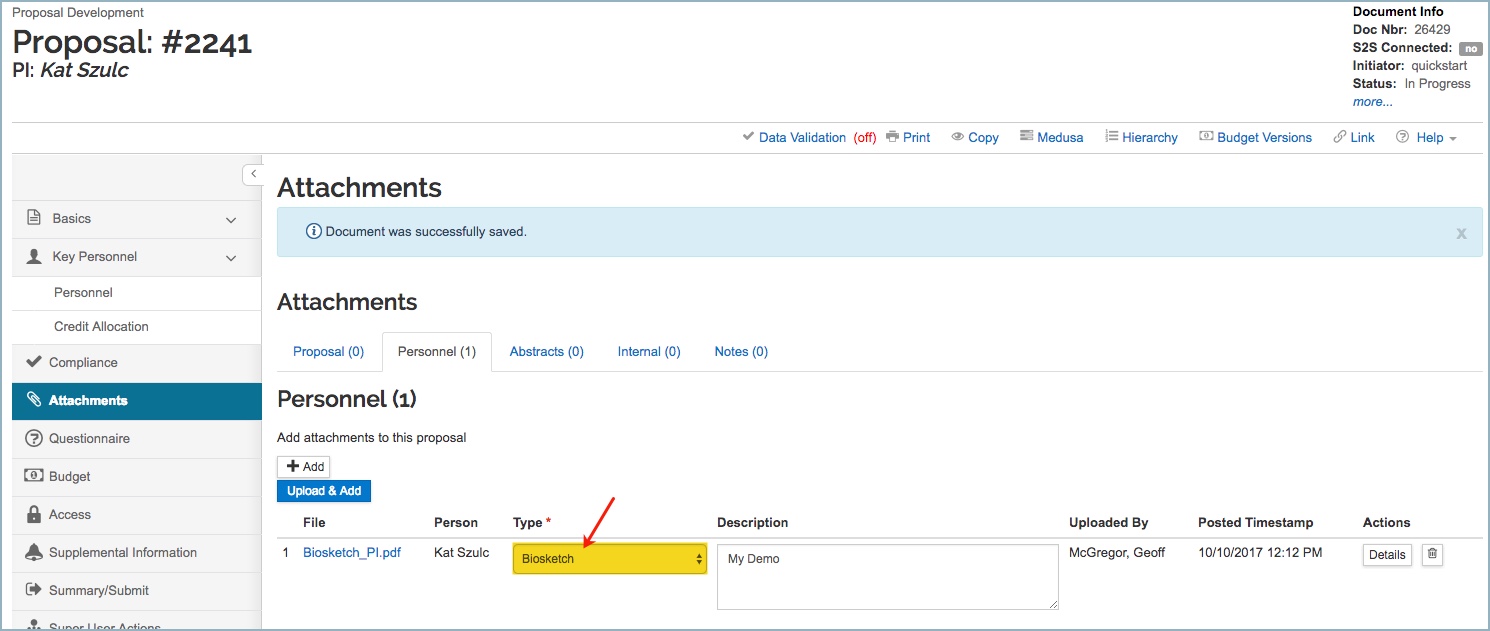
If the DEFAULT_BIOGRAPHY_DOCUMENT_TYPE_CODE Parameter is set to 1 (in my example, 1 = Biosktech), and the person added to Key Personnel section of the Proposal, has a Biosketch file maintained in their Person Extended Attributes, then that Biosketch file will be automatically added to the Proposal Attachments panel → Personnel tab, as the Type indicated in DEFAULT_BIOGRAPHY_DOCUMENT_TYPE_CODE Parameter:
Comments
0 comments
Article is closed for comments.