
Summary
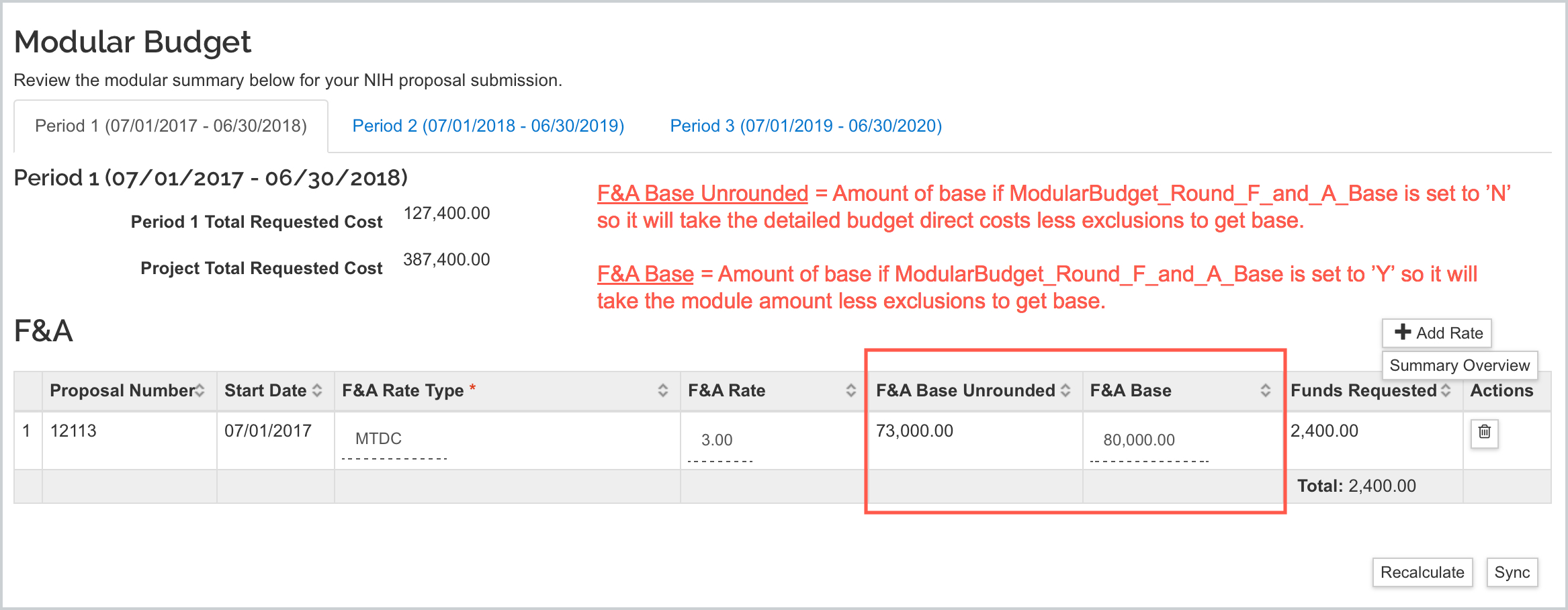
The Display_Unrounded_Modular_FNA Parameter determines whether the 'F&A Base Unrounded' field will display in the F&A panel of the modular budget. This can be used to assess the difference in calculation when testing the new feature controlled by the ModularBudget_Round_F_and_A_Base parameter. When the desired calculation method is decided it is recommended to set this parameter to 'false' so it doesn't confuse end users.
Further explanation on the modular budget F&A calculation functionality and examples can be found in the Modular Budget F&A Calculation Method Options article.
Valid Parameter Value(s)
The Display_Unrounded_Modular_FNA Parameter Parameter Value accepts a single value:
| Parameter Value | Description |
| true | Will display the 'F&A Base Unrounded' field in the F&A panel of the modular budget so you can compare the calculation methods for the ModularBudget_Round_F_and_A_Base parameter. |
| false | Will not display the 'F&A Base Unrounded' field in the F&A panel of the modular budget - default value. |
Related Maintenance Table(s)
- N/A
Related Parameter(s)
Example
If you set the parameter to 'true' you will see the below display:
Comments
0 comments
Article is closed for comments.