
Summary
The enableSalaryInflationAnniversaryDate Parameter allows institutions to apply / calculate inflation for budget personnel to occur on any of the 365 possible dates in the year, instead of a set / pre-defined date.
Valid Parameter Value(s)
The enableSalaryInflationAnniversaryDate Parameter Value accepts a single value:
| Parameter Value | Description |
| Y (or 1) | Allows calculating inflation for budget personnel for any of the 365 possible dates in the year (by utilizing the Salary Anniversary Date field in the Edit Personnel window in the Budget → Project Personnel section). |
| N (or 0) |
Salary increase will occur on a pre-defined date set for the Inflation type in the Institute Rate maintenance table regardless if a date is entered in the Salary Anniversary Date field in the Edit Personnel window in the Budget → Project Personnel section. |
Related Maintenance Table(s)
- Institute Rate
Related Parameter(s)
N/A
Example
If the enableSalaryInflationAnniversaryDate Parameter is set to Y and a Date is entered in the Person's Salary Anniversary Date field in their Edit Personnel window in the Budget → Project Personnel section, then, when a user budgets for that person, his/her salary will inflate as of the date entered in their Salary Anniversary Date field.
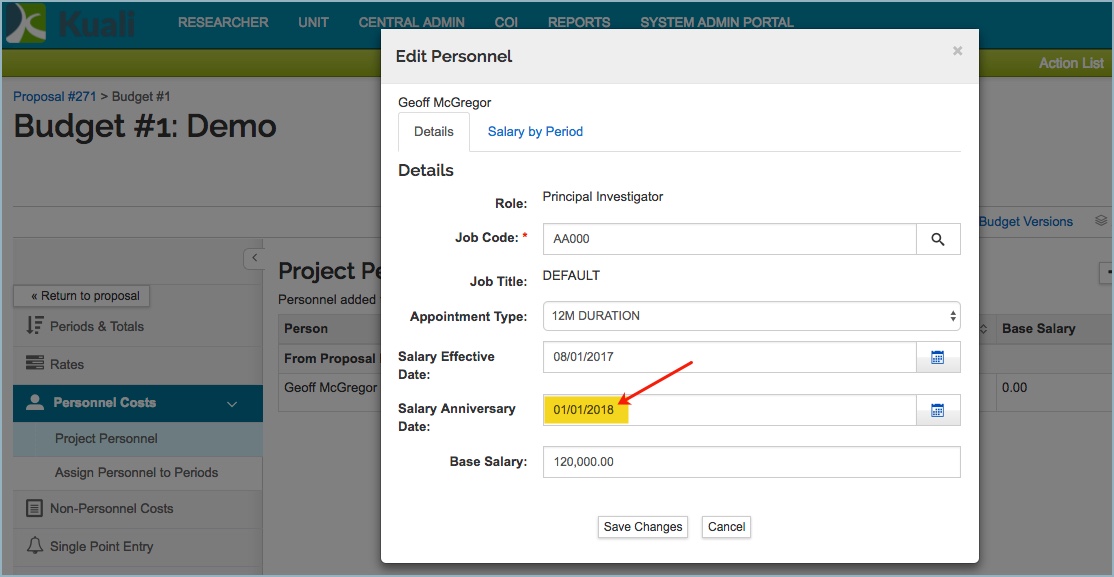
On the other hand, the salary inflation will take place on a pre-defined date set for the Inflation type in the Institute Rate maintenance table, if:
- The enableSalaryInflationAnniversaryDate Parameter is set to Y and the Person's Salary Anniversary Date field in their Edit Personnel window in the Budget → Project Personnel section is blank.
OR
- The enableSalaryInflationAnniversaryDate Parameter is set to N (even if a date is entered in the Person's Salary Anniversary Date field in the Edit Personnel window in the Budget → Project Personnel section.)
Comments
0 comments
Please sign in to leave a comment.